



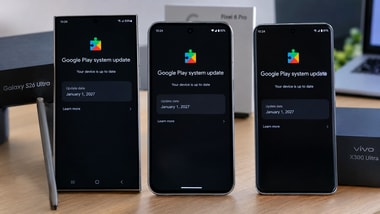
Several Android smartphones, including the Samsung Galaxy S26 Ultra, Google Pixel 8 Pro and Vivo X300 Ultra, are displaying an unexpected January 1, 2027 date for their Google Play System update. The problem came up months prior to the displayed date, in October 2026. According to reports on Reddit, the issue is impacting Android 12 users, including older phones.
The incorrect time on the device seems to be related to the Google Play System update, not a new Android OS update. Affected Samsung Galaxy S26 Ultra devices with the stable The One UI 9.0 interface has been updated with 100 MB in size, reports indicate. Google has not released a detailed changelog which explains the odd date. Here is everything users need to know about the update, its possible impact and how to check it on their phones.
System updates let Google update selected Android components without requiring a complete operating system upgrade. These updates can enhance services, security-related elements and compatibility on compatible devices.
However, the January 1, 2027 date is not an indication that Google has already published a future version of Android. According to reports, the date is probably a labelling/metadata mistake in the update. It’s not just Samsung phones; there have been similar dates reported from users of Pixel, Vivo and other Android devices.
At this point these false time stamps have not been proven to impact the normal operation of the phone, installed applications, or the performance of the device. It doesn’t imply that the phone is getting Android security patches for January 2027 as well.
The Play System update date is not correlated with the Android version and the security patch level. Users should check these details independently before assessing whether their devices are up to date.
The primary concern is that if the date is wrong, it is more difficult to determine which Google Play System update is installed. Google hasn’t stated in the reports it has released the cause of the issue or a specific fix.
For Samsung, it’s usually listed under Settings > Security and privacy > Updates > Play system update, but it can be under a different menu depending on the software version.
No. Reports suggest that changing the date and time settings or resetting the device does not correct the displayed timestamp. Users don’t need to reset their phones to factory settings just because it has a January 1, 2027, date.
Google has not confirmed when a correction will arrive.